
Best CS2 Launch Options 2026: Maximize FPS & System Performance
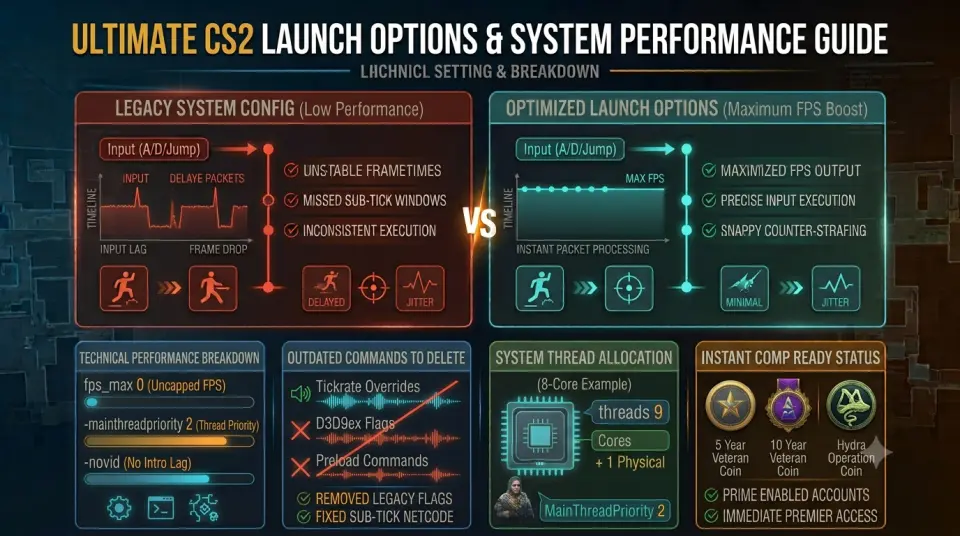
Configuring proper launch parameters in Steam is the first line of defense against unexpected stuttering, improper thread allocation, and launch delays in Counter-Strike 2. With Source 2 replacing legacy engine flags, cleaning outdated commands out of your launch settings is vital for maintaining peak system responsiveness.
Applying modern cs2 best launch options ensures your game executes with priority thread scheduling and zero intro lag. When pairing a streamlined client setup with an established profile, acquiring cs2 prime accounts with medals guarantees elite standing and instant access to communicative Premier lobbies.
Modern CS2 Launch Options Breakdown
To configure these commands, open Steam, right-click Counter-Strike 2, select Properties, and paste your command line into the Launch Options field under the General tab:
| Launch Command | Function & Benefit | Recommended Usage |
|---|---|---|
-novid |
Skips the Valve intro movie sequence, taking you directly to the main menu. | Essential for faster startup times. |
-mainthreadpriority 2 |
Assigns high priority execution to CS2's main process thread for smoother frame pacing. | Highly recommended replacement for legacy -high. |
+fps_max 0 |
Uncaps frame rate rendering to reduce input latency on high refresh rate displays. | Best paired with 144Hz+ monitors. |
-nojoy |
Disables system memory allocation for controller and joystick inputs. | Frees up minor RAM overhead. |
+exec autoexec.cfg |
Forces automatic loading of custom console commands and keybind scripts upon launch. | Mandatory for custom configs. |
For breaking news on patch notes, competitive updates, and pro setups, consult HLTV CS2 News.
Outdated CS:GO Launch Options to Delete
Many legacy launch commands floating around online no longer function in Source 2 or actively degrade game performance. Remove these outdated flags immediately:
-tickrate 128: Useless. CS2 uses a sub-tick system; fixed tick rate overrides do not exist.-d3d9ex/-nod3d9ex: Useless. CS2 operates on DirectX 11 / Vulkan, rendering DirectX 9 flags obsolete.+cl_forcepreload 1: Removed. This command was deprecated and can cause severe stuttering during map loading.
Hardware Thread Allocation Tuning
For modern multi-core processors, properly instructing the engine on physical core distribution prevents micro-stutters during heavy site executes:
// Example for 8-core processors (Physical Cores + 1)
-threads 9 -mainthreadpriority 2 -novid -nojoy +fps_max 0
Verifying Your Competitive Profile Setup
Pairing low-latency hardware performance with a legitimate, high-trust account allows you to focus purely on ranking up in Premier Mode.
If you need an entry-level account for casual play or practicing new lineups, securing a cheap cs2 prime account provides a clean slate. Alternatively, explore our full catalog of cs2 premier accounts to jump directly into high-rank competitive play.
Conclusion
Cleaning your Steam launch options removes legacy junk while optimizing CPU thread priorities for maximum frametime stability. Combining clean startup parameters with verified Prime profile status delivers a seamless competitive experience.
Explore the full inventory of high-trust CS2 options on WayToSmurf today and start your climb with optimal system performance.