Best CS2 Crosshair Settings 2026: Pro Import Codes & Precision Guide
Best CS2 Crosshair Settings 2026: Pro Import Codes & Precision Guide
Your crosshair is your primary point of interaction in Counter-Strike 2. Having a poorly scaled or distracting reticle causes misaligned shots, obscures distant headshots, and degrades your mechanical accuracy. Source 2 offers expanded reticle customization, allowing you to fine-tune gap size, dynamic recoil tracking, and outline thickness.
Pairing optimized cs2 crosshair settings with a high-trust profile ensures your mechanical skill translates into consistent wins. If you are looking to bypass entry-level matchmaking hurdles and test your accuracy in high-tier lobbies immediately, opting to buy prime cs2 account options gets you instant access to competitive Premier queues.
Pro CS2 Crosshair Import Codes (2026)
The fastest way to test competitive configurations is by importing proven reticle codes used by top esports professionals. Open your settings menu, click Share or Import, and paste any of these strings:
| Player / Style | Import Code String | Reticle Characteristics |
|---|---|---|
| Compact Static Green | CSGO-B4v9O-v78d7-S2pAQ-y2LpM-4Q6wQ |
Small gap, high contrast, ideal for tapping and long-range duels. |
| Center Dot Only (Cyan) | CSGO-9vQvE-3xLp2-w2uQ2-pL2vM-8Q6wQ |
Zero cross lines, ultimate headshot precision for AWP and single taps. |
| Classic Cyan Cross | CSGO-48sK3-V8v32-e8LpM-w2uQ2-8Q6wQ |
Standard medium gap, vibrant cyan color that stands out on all maps. |
| High Visibility Outlined | CSGO-7vQvE-5xLp2-w2uQ2-pL2vM-9Q7wQ |
Black outlines enabled to prevent crosshair blending against bright surfaces like Dust II. |
For more pro crosshair options and map-by-map testing breakdowns, check out the DMarket CS2 Pro Crosshairs Guide.
Key Console Commands for Manual Tuning
If you prefer building your own custom reticle, apply these console commands in your developer terminal or save them to your autoexec.cfg:
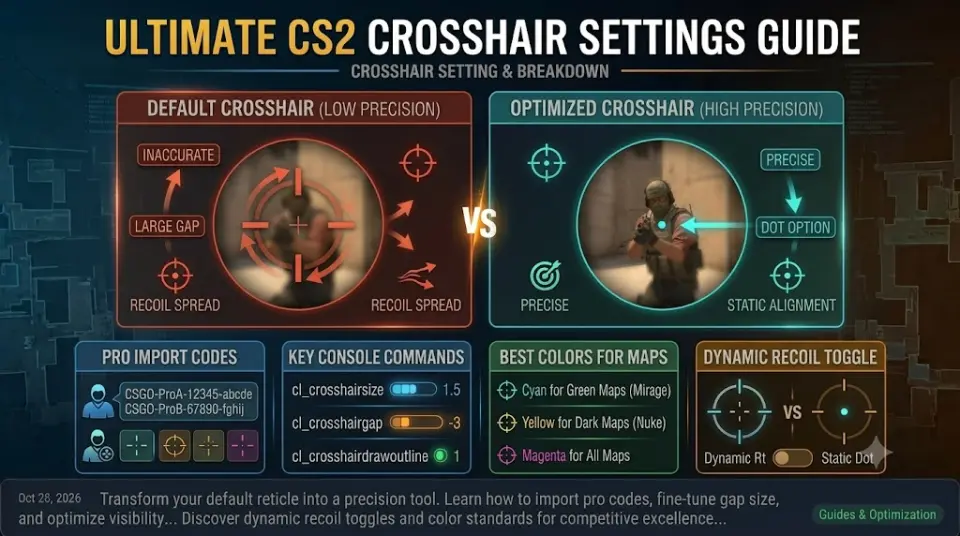
cl_crosshairsize 1.5: Controls the length of the crosshair lines (Keep under 2.5 for minimal visual clutter).cl_crosshairgap -3: Adjusts the space between lines. Negative values create a tighter center point.cl_crosshairdrawoutline 1: Enables a thin black border around lines to guarantee visibility against bright backgrounds.cl_crosshair_recoil 0: Keeps the crosshair static during firing instead of tracking spray recoil patterns (Recommended for muscle memory).cl_crosshairdot 0: Disables the center dot to prevent obscuring enemy head hitboxes at long distances.
Choosing the Best Color for Target Identification
Color selection is critical to ensure your crosshair does not blend into map textures like Mirage sands or Nuke walls:
- Green / Cyan (Best Overall): Highly distinct against almost all CS2 map geometry and player models.
- Yellow: Excellent contrast on dark maps like Inferno or Anubis, but can blend on Dust II.
- Magenta / Pink: Synthetic hue that never naturally appears on official map textures, ensuring 100% visual isolation.
Account Requirements for Clean Matchmaking
Having a pro-grade crosshair setup is useless if your matches are plagued by toxic players or uncalibrated lobbies. Ensure your competitive profile meets these basic standards:
- Verified Prime Status: Guarantees queue placement in official sub-tick Premier matchmaking.
- Full Ownership Details (OGE): Available on options like our 10/5 Year Coin Fresh Account to keep your profile permanently secure.
- Clean Ban Record: Zero historical VAC penalties, featured on established profiles like our 2026 Service Medal CS2 Account.
Conclusion
Finding your ideal crosshair configuration requires balancing reticle visibility with minimal screen distraction. Utilizing compact static crosshairs or small center dots improves headshot consistency across all ranges.
Explore our full line of Premier-ready inventory on WayToSmurf today and experience high-trust competitive play with your optimized setup.